PixInsight Modules
This page describes the StarNet and DeepSNR PixInsight modules: which repository to add, current releases and system requirements, and where the shared installation instructions live.
PixInsight repository setup
Supported PixInsight versions: 1.9.4 and 1.9.5 only. Intel Mac modules remain on PixInsight 1.9.4.
Use this shared flow to add the StarNet or DeepSNR repository in PixInsight. Current releases use a single repository for each tool.
Add repositories in PixInsight
If you need more detail on adding PixInsight repositories, follow the sequence below.
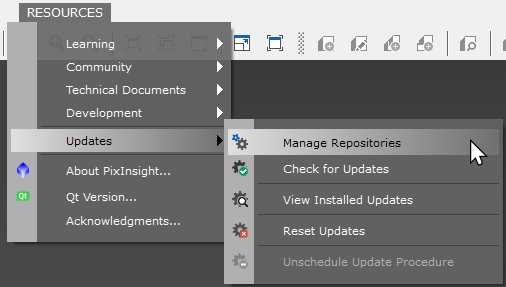
Open Resources → Updates → Manage Repositories.
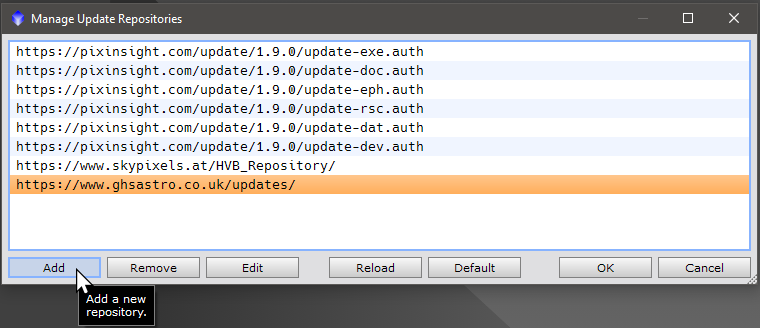
In the opened window, click Add to add a new repository URL.
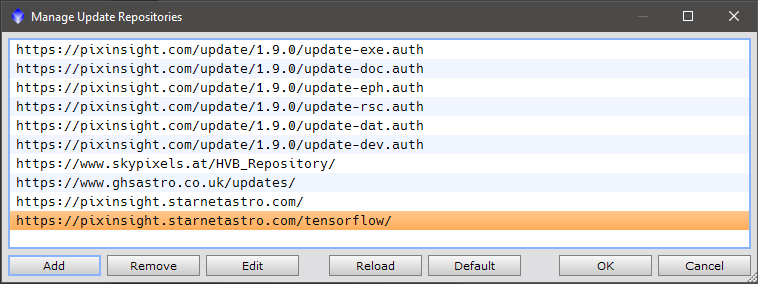
Enter the StarNet or DeepSNR repository URL. After the repository is added, apply updates, restart PixInsight, and verify the module appears and runs on a representative image.
StarNet: https://pixinsight.starnetastro.com/
DeepSNR: https://pixinsight.deepsnrastro.com/
Windows GPU acceleration
Current Windows ONNX Runtime packages support DirectML acceleration with CPU fallback. Advanced users experimenting with manual NVIDIA CUDA setup can see the Windows GPU acceleration instructions.